
Promotional Pricing in QuickBooks Online Without Losing Margin

Promotional pricing can increase sales, move slow inventory, and attract customers. But managing Promotional Pricing QuickBooks Online can become difficult when you have hundreds or thousands of SKUs.
The Pricing Assistant helps businesses manage bulk pricing, promotional pricing, markups, and margins while working alongside QuickBooks Online.
What Is Promotional Pricing?
Promotional pricing is a temporary price reduction designed to encourage customers to buy.
Common examples include:
Seasonal discounts
Clearance pricing
Limited-time promotions
Percentage-off sales
Special pricing on selected products
The goal is not simply to sell more. The goal is to increase sales without giving away unnecessary profit.

How Discounts Reduce Your Margin
Consider a product with:
Cost: $60
Regular price: $100
Regular gross margin: 40%
A 10% discount reduces the selling price to $90.
Your new margin becomes:
($90 − $60) ÷ $90 = 33.3%
A 10% discount reduced the gross margin from 40% to 33.3%.
That difference becomes even more significant when supplier costs have increased.
Example: Supplier Costs Changed
If the product's cost increases from $60 to $68 while the promotional price remains $90:
($90 − $68) ÷ $90 = 24.4% margin
The same promotion that originally produced a 33.3% margin now produces only 24.4%.
This is why promotional pricing should be evaluated against current product costs, not just historical prices.
The Problem With Spreadsheet-Based Promotions
Promotional Pricing QuickBooks Online
Many businesses manage promotions by exporting products to Excel, calculating discounts, and manually updating QuickBooks Online.
For a small catalog, that may be manageable.
For hundreds or thousands of SKUs, it becomes risky.
A typical process might involve:
Exporting product data.
Selecting promotional products.
Calculating discounted prices.
Checking margins.
Updating QuickBooks Online.
Restoring regular prices after the promotion.
Every additional manual step creates another opportunity for pricing errors.
The Pricing Assistant is designed to make bulk pricing changes easier while reducing spreadsheet-based pricing work.
Start With Your Minimum Margin
Instead of simply taking a percentage off the current price, determine the lowest acceptable price first.
For example, if a product costs $60 and your minimum acceptable margin is 30%:
$60 ÷ (1 − 0.30) = $85.71
That means approximately $85.71 is the minimum selling price needed to maintain a 30% gross margin.
You can then determine whether a promotional price of $90, $88, or another amount makes sense.
This approach protects your margin before the promotion is published.
Promotional Pricing vs. Volume Discounts
These pricing strategies are related but serve different purposes.
Pricing Strategy | Example |
Promotional pricing | Regular $100 → promotional $90 |
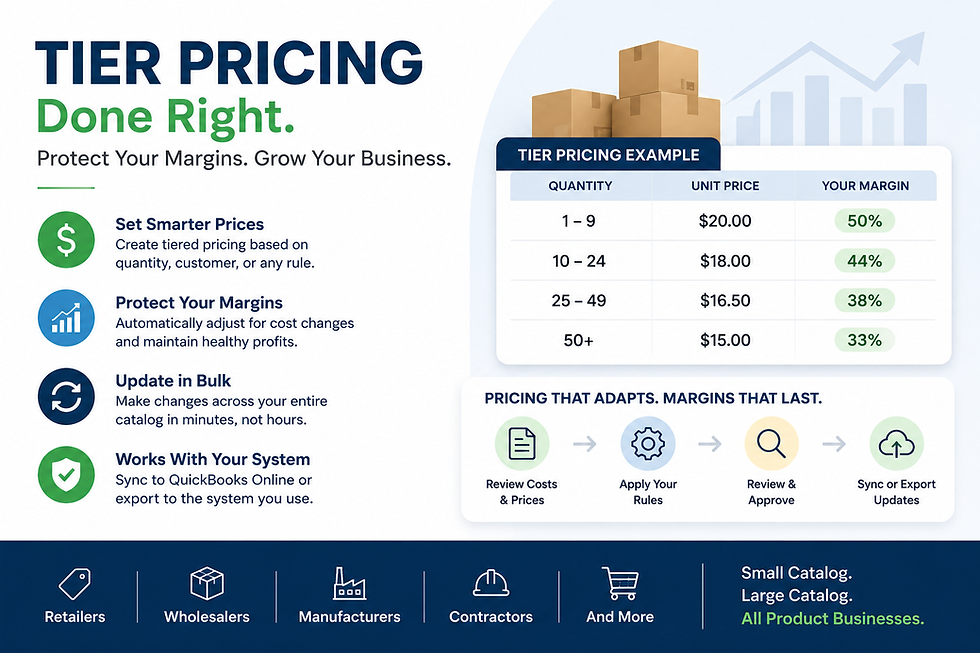
Volume discount | 1–4 units $100 → 10+ units $90 |
Tier pricing | Different prices for customer groups |
Businesses may use all three, but each should be evaluated against your margin targets.
Learn more about volume discounts in QuickBooks Online and tier pricing in QuickBooks Online.
Don't Forget to Restore Promotional Prices
Temporary promotions create another problem: remembering to return products to their regular prices.
Before launching a promotion, establish:
Regular price
Promotional price
Start date
End date
Products included
Minimum acceptable margin
Process for restoring regular pricing
A promotion should be treated as a controlled pricing change—not simply a lower price entered into QuickBooks.
Manage Promotional Pricing Across Your Catalog
For businesses with large product catalogs, manually changing promotional prices can take hours.
The Pricing Assistant helps businesses:
Update prices in bulk
Apply markups and markdowns
Manage promotional pricing
Review margins
Identify underpriced products
Validate pricing data
Manage large SKU catalogs
Sync pricing with QuickBooks Online
This gives businesses greater control over pricing without relying entirely on large spreadsheets.
Promotional Pricing Should Protect Profit
A successful promotion isn't simply one that increases sales.
Before reducing a price, know:
Current Cost → Promotional Price → Gross Margin → Minimum Acceptable Margin
When supplier costs, product prices, and promotions change frequently, keeping those numbers aligned becomes increasingly important.
For businesses using QuickBooks Online with large or frequently changing catalogs, The Pricing Assistant provides a more controlled way to manage pricing and protect margins.
Stop guessing what your promotions are doing to your margins.
See how The Pricing Assistant works and take control of your pricing.


Comments